
Showing posts with label Alexa. Show all posts
Showing posts with label Alexa. Show all posts
Sunday, 9 February 2020
H4Plugins finally released!
Monday, 15 July 2019
Esparto v3.3 released at last
 AT last! A "quick fix " to patch up a problem in someone else's library has just ended up being a 2-month ground-up rewrite. I am so fed up with the whole thing, I hope you lot all like it enough to cheer me up: Watch the video then go and have a play with it.
Esparto v3.3 released at last. Still some documentation being "backfilled" but the code should be ok and with 61 examples, you should be fine....
AT last! A "quick fix " to patch up a problem in someone else's library has just ended up being a 2-month ground-up rewrite. I am so fed up with the whole thing, I hope you lot all like it enough to cheer me up: Watch the video then go and have a play with it.
Esparto v3.3 released at last. Still some documentation being "backfilled" but the code should be ok and with 61 examples, you should be fine....
Friday, 17 May 2019

Sunday, 31 March 2019
Some "upgrades" weren't published, they escaped. A week of woe.
I have just come through a programming problem so frustrating, so annoying, so
intractable that not only has is it taken me well over a week of shouting at
the screen and hair-pulling, but also the only way to recover is the catharsis
of sharing my nightmare…and a very stiff drink.
There are many lessons to be learned herein: it’s going to
long, it will be very detailed and all-too-recently painful, but I think it
will be worth it if you can hang on in there.
Executive summary: code and library versions can be
important (and sometimes harmful!) …and “latest” is not always “best”
That nightmare started shortly after I released version 3.1
of Esparto… a couple of folk noticed problems. One in particular was using the
much-more up-to-date 2.5.0 core of Arduino ESP8266 whereas all my testing, development
and release had been with 2.4.2…
I felt churlish telling him it wasn’t supported, sorry - since I am the one behind the times and really
should be up-to-date myself, I always advise others to do so! I therefore set
up my “upstairs” machine with Arduino IDE 1.8.8 and ESP8266 core 2.5.0. to try to
a) verify the problem and b) work out a fix.
That's when the “fun” began. Sure enough,
the problem he described was happening exactly the same to me “upstairs” while
all was fine downstairs…before I continue, a touch of background is necessary:
Esparto relies fundamentally on the ESPAsyncWebServer
library which in turn relies upon the same author’s ESPAsyncTCP library. For
good measure (well, Amazon Echo uPNP discovery, actually) is also uses ESPAsyncUDP.
Note the common thread: “async”. Any / all / every piece of serious code on the
ESP8266 needs to be async...or it’s just a toy, but that’s a whole other book.
Back to my upstairs machine: unloved and unused for many a moon, it lacked those
essential libraries, so I installed them, automatically getting the latest version
– of course. The stage is now set for
Act I of the tragedy.
More background: Esparto has the fancy “real-time” GPIO
lights on its web UI, comme ca:

These were controlled using websockets (as was the whole of
the web user interface [web UI]) and after much similar recent wrestling, had led me to insert a ton of code to limit or “throttle” the amount / rate of
websocket messages going to the web UI. For example when a very “busy” GPIO might be changing
state hundreds of times a second, neither the ESP8266, nor any browser, nor indeed
your eyes can keep up with that so it makes sense to limit it, as failing to do
so has fairly rapid and disastrous consequences, namely the ESP8266 runs out of
free heap and crashes.
Lesson 1 is that if there is one key technique behind successful ESP8266 programming, it is heap
management. And being async! Two. Two main techniques. But heap management it absolutely
vital since the ESP8266 has so little and some libraries are very cavalier about
how they use it. At core 2.3.0 I couldn’t compile the whole of Esparto since
the core libraries didn’t leave enough free heap! In the early days, I also
experienced “random” crashes which took me a long time to put down to sudden massive
heap exhaustion (6k / 8k / 10k within seconds etc) within the ESPAsyncWebServer
library, with a) no warning and b) no way to check ahead of time when the “danger
zone” was imminent…
A quick bit of “long
story short” here which has ironic repercussions to follow later. About 9
months ago, I “had words” with the developer, even going as far as to provide a
graph showing the exact problem once I’d spent literally weeks tracking it down…in
essence there was no internal check before queuing a websocket write – neither that
there was sufficient heap nor whether a large queue was building because they
were coming in faster than they could be despatched…hence when either / both
those things occurred* the internal queue grew out of control and used all the
heap, crashing the system.
* = over 19x per second. Yep, a massive 19. Any more and the
free heap drops like a rock, irrecoverably. So three pins doing 6 transitions
each (e.g. flashing on/off 3x per sec) is fine. Add a fourth, and make it change
more than 1x per second and you are in a terminal one-way nose dive.
The complete lack of any way to detect / prevent this led to
my fairly strong words with the developer. I ended up doing a whole ton of work to calculate
this magic number, then another whole ton of work to “throttle” the GPIO and/or
any other control signals to /from the webUI. Anyway, that all worked. So I
carried on and released it.
Back upstairs, I am wondering how the hell only ever 8 items
get added to the “run” tab dropdown box. Wiresharking the conversation, I can
see I’m actually only sending 8 even though the code calls the sending function 22 times. Coincidentally I’m only sending 8 GPIO updates too even though dozens are physically occurring.
Very suspicious. Another “long story short” because it actually only took me an
hour or so to find the problem and my jaw dropped open in horror when I did.
The websocket lib (with which I was far too familiar due to
the problems above) has changed quite a lot. At the point of socket write it
effectively says
if messageQueue.length() < MAX_QUEUE_LENGTH, add message to
queue.
That’s it. No error code if it doesn’t get queued. No fall-back and
requeue. No warning message, not even at debug level! No way to
discover, let alone change the
hard-coded value of MAX_QUEUE_LENGTH which is…you guessed it: 8. Nope, anything
more than 8 outstanding requests just get silently ignored and thrown away. I
rushed to the author's webpage – no mention WHATSOEVER
of any of this in the documentation. Now what goddamn use is that to man or beast?
A caveat before I continue. Those libraries are close to
works of art, and I had (note past tense) nothing but admiration and respect
for the author (who does a ton of other seriously clever stuff too) and Esparto
couldn’t work without them. Thus it not only pains me, but I actually find it
quite difficult to come out and say just quite how shitty this “fix” is. I put it
down to either a) the author having had a seriously
bad night on the beer before “fixing” it or b) handing it off to a far, far, inferior
programmer to “do a quick fix”. It is honestly so out of character, I simply don’t
understand it. It stands out like a sore thumb compared with the rest of his
highly impressive code.
Irrespective, it renders that implementation of aync websockets
almost totally useless for any practical purposes. 19 per sec was pretty shabby
already: knocking it back to a carved-in-stone silently-discarding 8 is unforgivable.
Honestly, if the author had asked me to come up with a fix myself which must be
the worst possible solution on every front, I doubt if I could have managed
anything so appallingly slack-arsed as what now in there. If I were paying someone as a programmer
and they wiped this off their shoe,
they’d now be serving coffee at Starbucks. But it doesn’t run out of heap anymore. It is the equivalent
of fixing your car’s brake problems by removing the distributor cap.
So...
After the swearing had stopped (I’m lying, I still sometimes swear at the insult of it, and we are two weeks on…).
I remembered that Machiavelli said we must live in the world the way it is, not the way it should be: I needed another solution, and fast.
The Solution, Part 1: Out with the old
Websockets are bi-directional and I used them to react to UI
events such as clicking a button to reboot, or change tabs etc, so immediately
that all had to change. To be honest the JavaScript code was a bit “lace-curtain”
so I smiled through gritted teeth as I was forced to tidy it all up and make
classic “ajax” calls instead. Of course, I then had to re-jig a lot of the webserver
handling. While I’m doing so, I may as well do the JSON part properly…
Everything JSON I looked at was massively top-heavy, so I wrote
my own JSON encoder to handle a few specific cases of sending JSON data back to
the UI from std::vectors / std::maps which is how a lot of it is internally held.
After the first few days then, with an almost totally new 600-lines
of ajax-compatible JavaScript , completely reworked webserver functionality, websockets
ripped out root and branch and a custom JSON encoder written…phew…I was ready
to stitch in the “push” side of the bidirectionality, the little-known “Server-Sent
Events” or SSE. Luckily, it is already included in the ESPAsyncWebServer
library. I just prayed some ******* idiot hadn’t “throttled” it to a hardcoded
8-at-a-time like they’d done to the websockets! A brief look at the code showed
it appeared thankfully unfettered in that respect. Oh how much too soon I
smiled…
First, the elephant in the room. Why had I been working with
such an old library? Simply because there is no easy way to find out it had
changed. But 9months+??? Don’t shout yet, yes I know a lot of Arduino libraries
come up on that bloody annoying “some of your boards…” popup when you start the
Arduino IDE…the libs I’m talking about aren’t included. Why not, you will have
to ask the author. Technically, I know the reason: their metadata doesn’t match
exactly the format that Arduino uses to identify libraries when it trawls github.
Exactly why not, you will have to ask the author. Yes, I know that’s the second
time I said it. I’m not happy with him right now. And you’re probably only just
over halfway through the “fun”. I had consulted the docs dozens of times in
that 9 months. Nothing on the site to show a new release available. Docs
unchanged, even to the trained eye. Why would I think it needed updating? At
best it would have just shifted this problem back 7-8months.
Ironically (remember that far back) when you look at what
changed…much of it was obviously as a result of my graph…As the Chinese say: “Be
careful what you wish for”.
The Solution, Part 2: In with the new
Very new. I’d never heard of SSE before, so a bit of reading
and experimentation was needed. In reasonably short order, I had a prototype
working. The basic concept was there, now to the leg-work of replacing all the “push”
stuff which was mostly the GPIO pretty flashing lights, but due to heap constraints,
several of the “live” tabs have to be “fed” asynchronously and piecemeal too.
Again I’m smiling through gritted teeth because I am forced
unwillingly to make my code a lot better and more robust. At last, I am able to
implement the “persistence of vision” optimisation that allows me to “throttle”
the GPIO light to a rate that is just slightly faster than the human eye can
detect…no point throwing 100 events per sec (if the interface can handle it*)
at the webUi of you can only spot the difference in 24 “frames” per sec, like a
movie.
Actually it’s 23.80 – doing some simple maths will explain why – all Esparto
timing is in milliseconds…and all ESPArto “maths” uses integer arithmetic. Floating point bloats the bin incredibly and it overkill for a couple of small calculations. Giving a “delay”
to a timer requires telling it how many milliseconds to wait. For example,
500mS makes it run 2x per second (1000/500). Q: What it is 1000/24 ? A: 41.6666
if using floating-point, which I’m not, so it’s actually 41 from a truncated integer
divide. Now 1000/41 = 24.39 per second, slightly more than I need and - if I accept
that 23.809523 is close enough – which I do, then the divisor becomes 42. I
need say no more. On with the show.
The plan is that when someone is viewing the UI, I will “scan”
all GPIOs @ 24ish times per second and send a list of any that have changed to
the JavaScript that flips them red/green. Obviously, I don’t want that overhead
if no-one is watching so I have to be able to turn on off the “cinema projector”
when the theatre is empty, and restart it instantly as soon as another customer
arrives.
Also, I wanted – at last – to overcome the cheap’n’cheesy
limit that has long existed on only one web viewer. Slight trick with that is that different tabs
open for different viewers need different “live view” push data as well as the GPIO/
MQTT status etc that all active viewers need. Similarly any "watching" the same tab e.g. the graphs all need to sse the graphs updte at the same time. Managing that required a fair deal of extra code and rewrite to the webUI. Since I was having to “gut” the whole
code body, I thought I may as well take this chance to get it good once and for all. All
I finally need then is an easy way to detect incoming and outgoing clients.
Ah.
With a websocket you get “onConnect” and “onDisconnect”
events, which make it easy. SSE is one-way only "push" technology. It doesn’t really care
or stop working if it is “shouting at an empty room” so while obviously you get
a “connect” message; if the client dies or goes away, you never get a "disconnect". In fact, you don't get told at all.
This is a serious pain, but not fatal, on the JS side, the EventSource
reconnects automatically after a user-configurable “timeout” and provides the
messageID of the last message received, so you can tell the difference between
a new client (who needs the whole page) and an existing reconnect who just
needs continued live push data to whatever “tab” he’s on. With some
hoop-jumping and a home-brewed clientID handshake / special HTTP header in the
Ajax request / configurable periodic keep-alive “ping” – I can keep track of who’s
connected …and close down the hot-running cine projector when all the clients
timeout (strictly, after – on average – 1.5x the “ping” time…but anyway…)
Phew. A lot of rework, and a whole new
technology, but a better “product” results.
Until that is, you realise two things:
1: Haunting echoes: “…throwing 100 events per sec
(if the interface can handle it*)”. Asterisk = It can’t. To be fair, it can
handle a helluva lot more than 8 at a time! Due to the way I now incorporate
all changed GPIOs into a single “frame” it copes reasonably well with the
chosen 24ish fps. So If I have five or six pins all changing quite rapidly that’s the
equivalent of – say – 120 GPIO events / sec, shifting the bottleneck now to the
JS in the browser which usually can’t cope that fast…but hey: the eye can’t
tell. Also, anything throwing in hundreds per sec is still only going to get sampled
@ 24fps so while it may be a way removed from the physical truth, again your
eye can’t tell. At least we don’t get sudden huge heap losses. Until…
2: This:

Those downward spikes? The 4kB+ sudden "you-ain’t-go-it-no-more" bites out of the free heap that happen when the client side automatically
reconnects. Since there is no “on disconnect” or equivalent, it takes some time
of throwing 24fps at the library before it realises the client has gone and
breaks the connection. In the meanwhile, it queues up the requests into a
rapidly-growing heap-chomping MCU-crashing shitstorm just like... just like
those old websockets. Talk about frying pan and fire!
A week down the line
and all I have is the same problem in a whole ton of new untested code – but it’s
worse, again there is no way to predict
when it will occur. Nor is there any way that the library can / will tell
you.
It happens when the underlying network code decides to break
the connection, i.e. it’s a) too low down in the “stack” of code for me to even
want to go there b) probably beyond my knowledge c) it really is pretty random.
Upstairs it dies it every couple of seconds, down here it can go two minutes or
more without a blink. Only two things mitigate it: 1) it is usually* less than
the chunk the websockets used to grab. 2) The EventSource technology
auto-reconnects “for free” – so if you can stay alive through the big chunk –
albeit with a dead UI – then it pings back pretty quickly once the connection
is remade. It takes 3 -5 seconds for that to happen though so the user
experience is really choppy / stuttery / horrible.
*usually. It is usually
4kish but can be up to 10k in a couple of chunks and you can’t prevent it from
conflicting with another request e.g. an Alexa command or a 2nd
viewer using a REST call…either of which will take it further down the hill to
never-land on a one-way journey to the power-recycle switch. Something has to be
done.
A quick dive into the code shows that it has no checking, no
low/ heap prevention – ironically it is just exactly as bad the old websocket
code before the “fix”, but not yet quite as bad as the new. This time, I have
to prevent the same (very low) quality of “fix” taking out my final chance if I
notify the author and he “fixes” it up the same way.
I need another solution.
The only thing that can be detected is a sudden loss of about 4kb heap in a
very distinctive pattern. If only I can spot that from MY side of the fence
and then hit the “pause” button on the cine projector until at least most of it
has come back up once the auto reconnect is complete…I might be back in business.
You are going to think my solution was a bad choice and now –
more than a week later – so do I. At the time it seemed like an easy option(!): I
built a” heap heuristics” module deep into the scheduler which did a variety of
measurements at very high speed behind the scenes…instantaneous loss between
calls, rolling average loss (cyclical buffer over last N <configurable>
calls) percentage difference from a) last call b) rolling average…ultimately I
ended up with 2nd differential i.e. difference between last two differences
to try to narrow down the “acceleration” of the sudden 45 degree downward slope. Hmmm, really?
I spent days trying
to work out where best to put the code, as the actual values vary greatly
depending on where in the call stack it sits…etc. Should it run on all jobs (with a view to preventing other future problems) or just the GPIO "NetFlix" job? Even if its just on NetFlix, do I need to keep a portion running to keep the overall rolling average accurate...or do I just use the NetFlix rolling average? Is the "granularity" of last 10 measurements enough to "see" the nose-dive in time? Will I need more or will only 5 do it? And what of the trigger values? Even though they will (of course) be configurable - I know already they wont be the same at the next version!
The number of concurrent viewers change the trigger values.
Bad network connectivity changes them. More pins change them. Every ***ing thing changes them- to
the point where I could just about catch the node-dive about ¼ way down the slope, with
many false positives but – fatally – the occasional false negative, i.e. a missed - and potentially fatal -“trough”. So even ofr all the configurability and complexity, it still wasn't working.
Despite the odds, I persevered through four or five days
getting ever more frustrated and dispirited trying every permutation of placement,
parameters, method, technique – each variant requiring major rework…I wsa paraying a certain combination would hit a "sweet spot" where I could "predict" every imminent nosedive. All the
time I’m swearing and shouting “why can’t I just see the "$!%!"£$%^ing !"£$%^ message Queue length?????????????”
Because if I could, I'd be able to see when it starts getting longer than X
and immediately "back off" sending! Simples!
Not quite, because there is no way to pause to let it “drain”
since the only reason it starts to accelerate in the first place is because the underlying network
has already broken the link, so nothing will ever “consume” the queue contents. It took me a few days before that crushing realisation hit me. All I can do is wait until the library spots the network problem and then discards the whole
queue in one fell swoop, giving that sharp upward recovery seen on the graph, which takes
3-5 seconds. During whihc time- of course - the UI is "frozen". I'm sent stuttering back to square one.
But wait…when the library does notice the network problem and “chops” the queue…as mentioned earlier,
the JS notices pretty quickly and reconnects automatically. If I set that reconnection time very low
(1/2 sec say) and find a way to make the lib do that cleanup sooner, by -DING!
Spark of genius alert! – simply arbitrarily force-closing the connection, even while it’s
still “good”…
It might all be a bit “dirty” crashing and reopening the
connection all the time, but it will work. After all, upstairs with the weaker signal
it is already naturally doing it a lot anyway. All I’m doing is giving nature a
gentle early nudge! All I need is to get the queue length from the lib. Sounds
easy.
I had been avoiding relying on someone else’s code and
goodwill to accept my “fix” – but it’s the only way. How do I know? Because I put
in a quite easy fix requiring only about 2 small changes and a new 6 or 7 line
routine called getAvgMQL: “get average Message Queue Length”. A slight wrinkle is
that the AsyncEventSource has up to n clients and it is the client that has the
message Queue, so I have to average all the clients to get an overall figure.
By experimentation, a queue length of 15 seems a good balance between “choppiness”
and a harbinger of impending doom. Look at the following screenshot: running constantly
for over 7 hrs now with a lot of pin activity and a maximum “reconnect trough” of
about 2.5k That is the longest it’s been up for about 10 days.

The vertical bars are added when I do the forced close. As
you can see, a couple coincide with what might be the start of a "trough". Some don’t: they are either just natural “busyness” or plain and simple false
positives. Since forcing a close has very little overall effect on the
smoothness, and is actually now part of the "normal" mechanism, "Frankly, my dear, I don't give a damn!"
What I do
care is that the behaviour is – at last – predictable and controllable as well
as being a reasonably good user experience for quite a heavy load:
Esparto.flashPattern("   ... --- ...",250,LED4);
Esparto.flashPWM(1400,10,LED5);
Esparto.flashLED(500,LED6);
D4 is toggling at a rate of 125mS or 8x per second. D8(LED4)
is flashing S-O-S in morse code, i.e. … --- … on a timebase of 250ms i.e. each dot
/ dash is about 1/2 - 1/4 sec long sec on a continuous loop. D7(LED5) is a 10% duty cycle
blip in 1.4sec period and D6 (LED6) is a simple 2x per second “square wave” so when the “peaks”
line up, you are getting 12 transitions per sec from 4 different pins and the
UI appears pretty responsive. Being honest, it can’t quite “do” the three short Morse
blips, but now that it is stable and predictable, I can try upping the frame rate as
well as well as tweaking down the Q threshold to get the optimum result.
With hindsight, If I had chosen the ”investigate / reverse
engineer / fix / update” someone else’s highly complex library” route first, I’d
have saved myself well over a week and a lot of hair.
Lesson 2: Don’t shy away from tough decisions if - in the
long run – they are the best.
Lesson 3: Check your library versions regularly even if there
is no sign they may have changed!
Lesson 4: Not all “upgrades” are good ones. For example,
core 2.5.0 adds over 30k to the bin file for Esparto. Thirty K!!! It wouldn’t
be so bad, but Esparto is pretty big already – in core 2.4.2 its about 430k so
2.5.0 puts that up to 450k…kinda right on the limit of what can be OTA’d into a
1MB device with the minimum SPIFFS for the webUI… Worse there is less free heap
to start with, and what brought us here? Correct: low heap management - 2.5.0 just makes it worse. Right now , for me 2.5.0 is a huge
retrograde step – and if that weren’t bad enough, there’s a real killer:
Esparto will simply not serve up its web page in 2.5.0 – its like
it is running in glue / treacle. The exact same line-for-line code that works
(now!) perfectly under 2.4.2 cannot get to first base and – for now – I’m all
done with fixing other peoples’ bad upgrades. I’ll have to find a way around it
a some point.
On the plus side: The web code is much more robust, and more
easily expandabel if / when new features come along. The same is true of the
core code and a few quite useful new features have been added:
"repeatWhile" function. Repeat function f1 every n mSec while
f2 returns true and call f3after f2 returns zero to stop the repeat. This is
perfect for “worker” threads “chunking up” a job in the background to conserve
heap. F1 repeatedly performs a “chunk”, adjusting a counter / pointer F2 return
the counter / pointer while its non-zero (still work to do) f1 keeps repeating
and once all the data has been done, f3 can clean up / reset counters for next
time etc. All of this is “interleaved” with other tasks, minimising heap loss
and streamlining overall throughput.
Its what my "netFlix" function uses, and yes, I did call it that:
While there are any UI viewers, repeat the "send changed pin" @ ESPARTO_FRAME_RATE. Oncce all viewers have gone, reset initial conditions so next viewer restarts.
Its what my "netFlix" function uses, and yes, I did call it that:
if(!netFlix){
    Serial.printf("Start strobing @ %d (=%d.%dfps)\n",CII(ESPARTO_FRAME_RATE),1000/CII(ESPARTO_FRAME_RATE),((1000%CII(ESPARTO_FRAME_RATE)*100)/CII(ESPARTO_FRAME_RATE)));
    netFlix=repeatWhile([](){ return tab::nViewers(); },CII(ESPARTO_FRAME_RATE),
		[](){
		    vector<string> cp;
		    ESPARTO_CFG_MAP cPin;
		    int n=0;
		    for(int i=0;i<ESPARTO_MAX_PIN;i++){
			if(_spPins[i].dirty) cp.push_back(_light(i));
			_spPins[i].dirty=false;
		    }
		    if(cp.size()) _spoolBcast(jNamedArray("gpio",cp));
		},
		[](){ netFlix=0;Serial.printf("LAST PICTURE SHOW\n"); }
    ,ESPARTO_SRC_WEB,"flix");
}
While there are any UI viewers, repeat the "send changed pin" @ ESPARTO_FRAME_RATE. Oncce all viewers have gone, reset initial conditions so next viewer restarts.
Very simple but incredibly useful is vBar. It simply draws a
vertical bar of a given color (default = red) across all graphs asynchronously,
i.e. when you want it to happen, to show
when a particular event has occurred, in context. I could not have fixed this
problem without it!
Thrown in are web basic auth and the ability to change MQTT
parameters through the UI and Amazon Echo v3 compatibility among several
others minor changes.
Esparto v3.2 will be (code-wise) very different from v3.1 (almost a
re-write!) even though it will look almost 90% the same! It will be out as soon
as I’ve had a day off and got some of the new documentation(yuk) fixed up and
new example code written.
Tuesday, 26 February 2019
Esparto v3 finally released!
Blimey, it's finally done. Esparto v3.0.0 released! (subject to some documentation additions and tweaks) Some fun facts:
281 files in 72 folders totalling 11.8MB
Main code is 16 source files totalling 3742 lines of code
Includes 47 example sketches totalling 3704 lines of code..I'm happy to call it 7500 lines of code...
281 files in 72 folders totalling 11.8MB
Main code is 16 source files totalling 3742 lines of code
Includes 47 example sketches totalling 3704 lines of code..I'm happy to call it 7500 lines of code...

Monday, 27 August 2018
Esparto v2.0 finally released!
Yes, it's "out of the door" at last. After some final "stress" testing and the creation / testing of 32 (yes, thirty-two) example programs, v2.0 finally goes public.
Intervening health problems added 8 months to the date(!) but at last I can now relax somewhat- with a well-earned beer.
Get Esparto v2.0 here at github
Intervening health problems added 8 months to the date(!) but at last I can now relax somewhat- with a well-earned beer.
Get Esparto v2.0 here at github
Monday, 20 August 2018
Esparto V2 almost ready! The new web UI part 6
The lower panel(s)
Run

This is literally where the action happens. Esparto is designed so that commands can come from several sources:
- MQTT topics
- the web UI
- from within the app itself using the "invoke" functio
The first is one of the most common forms of communications between IOT "things" in home automation. You obviously need access to an MQTT "broker" (fancy name for "server", really) either your own or public one. At this very moment, there is no way to enter a username and password - except manually in your own code - so until I get that fixed... your own broker is the best bet. I use mosquitto (which can be found Mosquitto.org download page) on a raspberry Pi.
But don't despair if none of those options are available, you can still do a lot with Esparto through its own UI, or from your own code. Want to change GPIO0 (D3)'s debounce value for example? Either call Esparto.invoke("cmd/pin/cfg/0/15"); or come to this screen, select the cfg option form the dropdown menu, add the /0 to the Topic line and type 15 into the payload field. Then hit "Simulate MQTT" - Esparto's internals that actually "do the business" are called with exactly the same message as they would have received from a genuine MQTT server. Simples.
As commands are received and actioned (from any source) the stats are dynamically updated. Soon - and certainly before release - I shall add "Alexa" as a source because Esparto is fully Alexa-compatible by pretending to be a Belkin WeMo when asked in the right way. All it can do is "turn on "<your device> or "turn off" the same. That's as much as a lot of devices do, anyway.
The "all" source is special one built in to Esparto allowing you to send a single command to all Esparto device on your 'net, as well as addressing each one indvidually by its device name. For example - while not necessarily advised - "all/cmd/reboot" will do exactly what you think it would.
Users can to subscribe to any topic they choose - including # wildcards - when called back in onMQTTConnect (see previous post in the series for a simple example).
In the demo, the user has subscribed to a wildcard topic like so:
  Esparto.subscribe("wild/#",[](vector<string> vs){
        string suit=vs.front();
        Serial.printf("Wilcard handler suit is , card is %s\n",(CSTR(suit)),CSTR(vs.back()));
        if(suit=="hearts" || suit=="clubs" || suit=="diamonds" || suit=="spades"){
          Serial.printf("You chose the %s of %s\n",CSTR(vs.back()),CSTR(suit));
        }
        else Serial.printf("Invalid suit %s\n",CSTR(suit));
    },"cards");
(They also included (not shown) a simpler topic "flash" which they wrote to call the same code as Alexa commands call. So when Alexa is told to "turn on testbed" it has the same effect as MQTT command "testbed/flash/1" for on and ...0 for off. )
He/she has chosen to only allow this wildcard topic from another made-up source "cards" so "testbed/wild/party" won't work, but" cards/wild/animal "will.
And therein lies a slight oddity - and a caution. Esparto cannot predict the billions of permutations that come after ...wild/ - only the user can decide that. Hence for the system to work Esparto not only has to accept anything of that form, it also has to add it to the above table and count it and that has consequences.
The user code in the demo rejects any subtopic except (rather suitably) hearts, clubs, diamonds and spades and would like the payload to be a card from 2 to 10 or J K Q A. Lazily, it doesn't actually validate the payload, but then all it does is parrot ack to you what you send it, so no harm done in this contrived case. In the real world such appalling coding (I should know, I wrote it - deliberately to bring out these points of course) will almost certainly lead to a crash if unexpected, unvalidated input and/or gibberish is fed to any wildcard topic - so be careful. Trust no-one, and validate everything to within an inch of its short life.
Another consequence is that the more wild rubbish you send that Esparto is duty-bound to accept, the longer that list will get, the slower the UI will become until finally Esparto's self-protection mechanisms will cut in and reject everything from all sources until some memory is freed somehow. This will certainly cause erratic behaviour and possible meltdown at the nuclear power plant, so don't do it. If no memory can get freed, then your Esparto app will die a slow lingering death till you want to reboot it. When you do, remember it's your fault, not Esparto's.
While this a shorter section than some others, this pane is probably one of the most useful of Esparto's many features. There is neither the space nor the time to go into detail about each of the commands and new ones are being thought of as I type...
You may find that all the ...dump... options are missing from the final release, as they are 90% used in debugging. It will be done in such a way that even average programmers will be able to hack into the code and just turn on a #define and recompile. They do steal heap though, whic is already in short supply so don't say you haven't been warned. On the other hand if I can trim some fat from elsewhere during my final code tidy, I might leave some/all of them in. Invoke("cmd/watch/this/space"), you might say.
Others are just fun to play with: .../pin/flash/... , .../pin/pwm/... and .../pin/pattern for example/...
Download the release when it's out "soon", edit in your own SSID/password/device name and give all the topics/commands a try - it's what Esparto is for. Or wait 3 minutes for it to give up and go into AP mode then configure it with your phone.
And enjoy it!

- MQTT topics
- the web UI
- from within the app itself using the "invoke" functio
But don't despair if none of those options are available, you can still do a lot with Esparto through its own UI, or from your own code. Want to change GPIO0 (D3)'s debounce value for example? Either call Esparto.invoke("cmd/pin/cfg/0/15"); or come to this screen, select the cfg option form the dropdown menu, add the /0 to the Topic line and type 15 into the payload field. Then hit "Simulate MQTT" - Esparto's internals that actually "do the business" are called with exactly the same message as they would have received from a genuine MQTT server. Simples.
As commands are received and actioned (from any source) the stats are dynamically updated. Soon - and certainly before release - I shall add "Alexa" as a source because Esparto is fully Alexa-compatible by pretending to be a Belkin WeMo when asked in the right way. All it can do is "turn on "<your device> or "turn off" the same. That's as much as a lot of devices do, anyway.
The "all" source is special one built in to Esparto allowing you to send a single command to all Esparto device on your 'net, as well as addressing each one indvidually by its device name. For example - while not necessarily advised - "all/cmd/reboot" will do exactly what you think it would.
Users can to subscribe to any topic they choose - including # wildcards - when called back in onMQTTConnect (see previous post in the series for a simple example).
In the demo, the user has subscribed to a wildcard topic like so:
Esparto.subscribe("wild/#",[](vector<string> vs){ string suit=vs.front(); Serial.printf("Wilcard handler suit is , card is %s\n",(CSTR(suit)),CSTR(vs.back())); if(suit=="hearts" || suit=="clubs" || suit=="diamonds" || suit=="spades"){ Serial.printf("You chose the %s of %s\n",CSTR(vs.back()),CSTR(suit)); } else Serial.printf("Invalid suit %s\n",CSTR(suit)); },"cards");(They also included (not shown) a simpler topic "flash" which they wrote to call the same code as Alexa commands call. So when Alexa is told to "turn on testbed" it has the same effect as MQTT command "testbed/flash/1" for on and ...0 for off. )
He/she has chosen to only allow this wildcard topic from another made-up source "cards" so "testbed/wild/party" won't work, but" cards/wild/animal "will.
And therein lies a slight oddity - and a caution. Esparto cannot predict the billions of permutations that come after ...wild/ - only the user can decide that. Hence for the system to work Esparto not only has to accept anything of that form, it also has to add it to the above table and count it and that has consequences.
The user code in the demo rejects any subtopic except (rather suitably) hearts, clubs, diamonds and spades and would like the payload to be a card from 2 to 10 or J K Q A. Lazily, it doesn't actually validate the payload, but then all it does is parrot ack to you what you send it, so no harm done in this contrived case. In the real world such appalling coding (I should know, I wrote it - deliberately to bring out these points of course) will almost certainly lead to a crash if unexpected, unvalidated input and/or gibberish is fed to any wildcard topic - so be careful. Trust no-one, and validate everything to within an inch of its short life.
Another consequence is that the more wild rubbish you send that Esparto is duty-bound to accept, the longer that list will get, the slower the UI will become until finally Esparto's self-protection mechanisms will cut in and reject everything from all sources until some memory is freed somehow. This will certainly cause erratic behaviour and possible meltdown at the nuclear power plant, so don't do it. If no memory can get freed, then your Esparto app will die a slow lingering death till you want to reboot it. When you do, remember it's your fault, not Esparto's.
While this a shorter section than some others, this pane is probably one of the most useful of Esparto's many features. There is neither the space nor the time to go into detail about each of the commands and new ones are being thought of as I type...
You may find that all the ...dump... options are missing from the final release, as they are 90% used in debugging. It will be done in such a way that even average programmers will be able to hack into the code and just turn on a #define and recompile. They do steal heap though, whic is already in short supply so don't say you haven't been warned. On the other hand if I can trim some fat from elsewhere during my final code tidy, I might leave some/all of them in. Invoke("cmd/watch/this/space"), you might say.
Others are just fun to play with: .../pin/flash/... , .../pin/pwm/... and .../pin/pattern for example/...
Download the release when it's out "soon", edit in your own SSID/password/device name and give all the topics/commands a try - it's what Esparto is for. Or wait 3 minutes for it to give up and go into AP mode then configure it with your phone.
And enjoy it!
Wednesday, 8 August 2018
ESP8266 music-driven flasher in only 6 lines of code!!! (Part 1)
Firstly, I must apologise for having been away so long - I had a little medical problem. (Well, not so little...). What is little though is the number of lines you need to get a fully functional and stable ESP8266 / Arduino project off the ground using my "Esparto" library (of which more later)
Let's see it working. Second apology: I'm sorry about the distracting voiceover on the video but I discovered that Facebook recognises audio content and mutes them if it detecs copyrighted content! It's both unnerving and clever. Since I chose David Bowie's "China Girl" for the demo, I fell foul of the rule, of which - up until that point - I was blissfully unaware! I broke the system by talking loudly over it and re-uploading.
Now I guess that flashing LEDs on ESP8266s are not a new thing, but the whole point of the demo is this, which I hope is more surprising:
There's not much to explain, the pinMode does what the standard Arduino pinMode does, and a little bit more. The two extra parameters tell Esparto when the pin is "active" i.e. what binary state constitues "on" and what its inital state should be, thus saving you the digitalWrite. It defaults to LED_BUILTIN and on many dev boards it is active LOW, i.e. when you write 0 its turns on and goes off when you write 1. So here, we tell it to start "off" which is HIGH for the LED_BUILTIN on a Wemos D1, If that's confusing, I agree, but Esparto worries about all that for you. The Esparto.pinMode defaults are ...,HIGH, LOW); for "normal" LEDs so if yours is one of those just write: Esparto.pinMode(MY_LED,OUTPUT); as you would do normally, where MY_LED is set to your chosen active HIGH "normal" pin.
The next line is where the action happens - all of it. The syntax may look a) new b) odd c) horrible, and if you don't know what a C++ "lambda function is, look it up now. A good explanation can be found here. You don't need one for Esparto, the name of an ordinary function will do e.g. onPinChange - but using the lambda saves you having to write a whole extra function whose core is juist one line - in this case pulseLED.
Esparto's pulseLED does exactly what it says on the tin: it pulses or "blips" an output pin for a given number of milliseconds. In our case we choose just one millisecond which may seem as if its going to be waaay to short for our eyes to see. The sound sensor - when calibrated correctly - is going to be throwing binary 1s and 0s into pin D6 faster than you can dream of so when you "stack up" a lot of 1ms pulse into a second you get...well, you have seen the video!
So this weird "lambda" thing just calls pulseLED and because we have used the "raw" version of Esparto's many input pin types, we will get every* flicker. The pin value is passed to the lambda (or your own function) every time it changes* in the v parameter. So we filter out only the 1s (a bit like a RISING interrupt - if you know what that is - and a forthcoming blogpost will explain why with Esparto, 99% of the time you don't need to).
If it makes you feel easier, the following does exactly the same:
It's just that the lambda version allows me to make the (much more) astounding claim of "...in only 6 lines"! Well worth the effort, I thought.
And that's all there is to it. If you are not impressed, then think of this:
If you change the Esparto line to: ESPArto Esparto(yourSSID.yourPWD); a number of wonderful things occur.
Firstly, you will be abe to see a webserver running on your tiny device that allows you to watch the pins flash on and off, reconfigure itself in numerous ways and even simulate receiving MQTT commands...Oh, I almsot forgot: it responds to Amazon's Alexa.
If that sounds all a little too flashy(1) then be aware you can also flash any LED with just 1 line: flashLED(1000,myPin) for example. Or flash a series of pulses in PWM style, e.g. flashLED(1000,25, myPin) will give a 250ms pulse (25% of 1000) every 1sec (1000ms). Enough? What about flashing a repetetive pattern such as S-O-S in morse code? Yes, you guessed it: flashLED("... --- ...",myPin). You can even have many LEDs all flashing at different rates, patterns etc without any problems and with only a few lines of code.
If a raw pin is no use to you, choose from:
*as long as it happens no less than 120 microseconds after the previous one...a forthcoming article will explain this and why using notoriously tricky interrupts may well be a thing of the past since Esparto
Let's see it working. Second apology: I'm sorry about the distracting voiceover on the video but I discovered that Facebook recognises audio content and mutes them if it detecs copyrighted content! It's both unnerving and clever. Since I chose David Bowie's "China Girl" for the demo, I fell foul of the rule, of which - up until that point - I was blissfully unaware! I broke the system by talking loudly over it and re-uploading.
Now I guess that flashing LEDs on ESP8266s are not a new thing, but the whole point of the demo is this, which I hope is more surprising:
#include <ESPArto.h>

ESPArto Esparto;

void setupHardware(){

    Esparto.Output(LED_BUILTIN,LOW,HIGH);

    Esparto.Raw(D6,INPUT_PULLUP,[](int v){ if(v) Esparto.pulseLED(1); });

}
No, there is nothing missing: that's the whole code! And it "just works" as you can see from the video. Yes, there is no setup() function and no loop() function. Esparto takes care of all of that. It manages the whole of the ESP8266 hardware (with all its complexities and traps waiting for the unwary beginner) and calls your code only when it is safe to do so. This means no more random crashes, WDT resets and other common "gotcha"s.There's not much to explain, the pinMode does what the standard Arduino pinMode does, and a little bit more. The two extra parameters tell Esparto when the pin is "active" i.e. what binary state constitues "on" and what its inital state should be, thus saving you the digitalWrite. It defaults to LED_BUILTIN and on many dev boards it is active LOW, i.e. when you write 0 its turns on and goes off when you write 1. So here, we tell it to start "off" which is HIGH for the LED_BUILTIN on a Wemos D1, If that's confusing, I agree, but Esparto worries about all that for you. The Esparto.pinMode defaults are ...,HIGH, LOW); for "normal" LEDs so if yours is one of those just write: Esparto.pinMode(MY_LED,OUTPUT); as you would do normally, where MY_LED is set to your chosen active HIGH "normal" pin.
The next line is where the action happens - all of it. The syntax may look a) new b) odd c) horrible, and if you don't know what a C++ "lambda function is, look it up now. A good explanation can be found here. You don't need one for Esparto, the name of an ordinary function will do e.g. onPinChange - but using the lambda saves you having to write a whole extra function whose core is juist one line - in this case pulseLED.
Esparto's pulseLED does exactly what it says on the tin: it pulses or "blips" an output pin for a given number of milliseconds. In our case we choose just one millisecond which may seem as if its going to be waaay to short for our eyes to see. The sound sensor - when calibrated correctly - is going to be throwing binary 1s and 0s into pin D6 faster than you can dream of so when you "stack up" a lot of 1ms pulse into a second you get...well, you have seen the video!
So this weird "lambda" thing just calls pulseLED and because we have used the "raw" version of Esparto's many input pin types, we will get every* flicker. The pin value is passed to the lambda (or your own function) every time it changes* in the v parameter. So we filter out only the 1s (a bit like a RISING interrupt - if you know what that is - and a forthcoming blogpost will explain why with Esparto, 99% of the time you don't need to).
If it makes you feel easier, the following does exactly the same:
...

void onPinChange(int v){

if(v){
  smartPins.pulseLED(1);
  }
}

...

Esparto.Raw(D6,INPUT_PULLUP,onPinChange);
...
It's just that the lambda version allows me to make the (much more) astounding claim of "...in only 6 lines"! Well worth the effort, I thought.
And that's all there is to it. If you are not impressed, then think of this:
If you change the Esparto line to: ESPArto Esparto(yourSSID.yourPWD); a number of wonderful things occur.
Firstly, you will be abe to see a webserver running on your tiny device that allows you to watch the pins flash on and off, reconfigure itself in numerous ways and even simulate receiving MQTT commands...Oh, I almsot forgot: it responds to Amazon's Alexa.
If that sounds all a little too flashy(1) then be aware you can also flash any LED with just 1 line: flashLED(1000,myPin) for example. Or flash a series of pulses in PWM style, e.g. flashLED(1000,25, myPin) will give a 250ms pulse (25% of 1000) every 1sec (1000ms). Enough? What about flashing a repetetive pattern such as S-O-S in morse code? Yes, you guessed it: flashLED("... --- ...",myPin). You can even have many LEDs all flashing at different rates, patterns etc without any problems and with only a few lines of code.
If a raw pin is no use to you, choose from:
- Debounced
- Encoder
- EncoderAuto
- Latching
- Polled
- Reporting
- Retriggering
- Timed
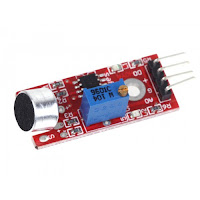
One important point to note is to power it from the 3.3v rail. NOT the 5v! Connect the lead labelled DO (Digital Output) to your chosen pin on your ESP8266, nodeMCU etc - Esparto works on pretty much any dev board with an ESP-12 module on it. The demo uses a Wemos (now LOLIN) D1 mini and I chose GPIO12 which is Arduino digital D6 and turn the music up LOUD! Seriously, those cheap sensors are not very sensitive and you will need to be very close to the speaker. Also, you will have to calibrate the sensor by twiddling the tiny trimpot until it is just on the edge of going wild...then sit back and enjoy.
In part 2, we will look at a slightly more advanced version that a) uses a different technique from Esparto's built-in pulseLED function and b) uses a rotary encoder to "tweak" the LED response for a much more subtle and pleasing effect. Don't worry, as you may expect by now, its only a few extra lines.
*as long as it happens no less than 120 microseconds after the previous one...a forthcoming article will explain this and why using notoriously tricky interrupts may well be a thing of the past since Esparto
Subscribe to:
Posts (Atom)