Search This Blog

Monday, 24 February 2020

Why can't Facebook spot obvious spammers?


"Mike Taylor" recently tried to post to a tech Facebook group I moderate.
First alarm bell: FB Profile is “farhad.shah” 2nd Bell: “Social Media Advertiser” = “spammer”
3rd Bell: Works at facebook, eh?  Now take a mental photo of that Python Data Science post by electropedias.com – we’ll come back to it
Alarm bell 4: 4,999 friends and not one of them called Taylor – is this man a reclusive orphan?

“People are judged by the company they keep”: Mostly Asian, mostly from Pakistan and SO many who also “Work for Facebook”…by which I think they mean “work all day spamming facebook with commercial posts”


Back to Mike/Farhad – The majority of the photos have the same fella in them, I’m assuming its Farhad, so…
…….


…why the beefy and completely different profile photo:


…which appears all over the net on Instagram posts advertising everything from dresses to makeup?


My conclusion is Mike Taylor is not his real name…but let’s look at what he posts: A lot of it is for “electropedias.com” who seem not to care who they spam: This page ostensibly about music and with many Ukranian links is owned by…”electropedias.com” – of Pakistan. Shocker!


I could go on, but what’s the point?


This was the best I could do:


Sunday, 9 February 2020

H4Plugins finally released!


And finally...112 files of IOT goodness for ESP8266, ESP32 and (excepting WIFi) STM32-NUCLEO. It was designed to make it easy for you to write custom IOT apps running multiple simultaneous functions. It is currently running my own home. Go get it now - I hope you find it useful. https://github.com/philbowles/h4plugins

Sunday, 21 July 2019

Multi tasking with Esparto


Meet “The Beast”: a WEMOS D1 mini using every single GPIO concurrently, running a 3-led traffic light sequencer, which is speed-controlled by a rotary encoder and “switch on and offable” with a PIR motion sensor. It also has an analog temperature sensor, multi-function pushbutton control and real-time graphs: 3x system graphs and 2x user-defined graphs. All of this shown in real-time on the built-on Web User interface and controllable via serial console, MQTT or HTTP REST interface.
All running smoothly and co-operating harmoniously courtesy of Esparto and all in only a few lines of code!


Monday, 15 July 2019

Esparto v3.3 released at last

AT last! A "quick fix " to patch up a problem in someone else's library has just ended up being a 2-month ground-up rewrite. I am so fed up with the whole thing, I hope you lot all like it enough to cheer me up: Watch the video then go and have a play with it. Esparto v3.3 released at last. Still some documentation being "backfilled" but the code should be ok and with 61 examples, you should be fine....

Sunday, 31 March 2019

Some "upgrades" weren't published, they escaped. A week of woe.


I have just come through a programming problem so frustrating, so annoying, so intractable that not only has is it taken me well over a week of shouting at the screen and hair-pulling, but also the only way to recover is the catharsis of sharing my nightmare…and a very stiff drink.

There are many lessons to be learned herein: it’s going to long, it will be very detailed and all-too-recently painful, but I think it will be worth it if you can hang on in there.

Executive summary: code and library versions can be important (and sometimes harmful!) …and “latest” is not always “best”

That nightmare started shortly after I released version 3.1 of Esparto… a couple of folk noticed problems. One in particular was using the much-more up-to-date 2.5.0 core of Arduino ESP8266 whereas all my testing, development and release had been with 2.4.2…

I felt churlish telling him it wasn’t supported, sorry -  since I am the one behind the times and really should be up-to-date myself, I always advise others to do so! I therefore set up my “upstairs” machine with Arduino IDE 1.8.8 and ESP8266 core 2.5.0. to try to a) verify the problem and b) work out a fix. 

That's when the “fun” began. Sure enough, the problem he described was happening exactly the same to me “upstairs” while all was fine downstairs…before I continue, a touch of background is necessary:

Esparto relies fundamentally on the ESPAsyncWebServer library which in turn relies upon the same author’s ESPAsyncTCP library. For good measure (well, Amazon Echo uPNP discovery, actually) is also uses ESPAsyncUDP. Note the common thread: “async”. Any / all / every piece of serious code on the ESP8266 needs to be async...or it’s just a toy, but that’s a whole other book. Back to my upstairs machine: unloved and unused for many a moon, it lacked those essential libraries, so I installed them, automatically getting the latest version – of course. The stage is now set for Act I of the tragedy.

More background: Esparto has the fancy “real-time” GPIO lights on its web UI, comme ca:


These were controlled using websockets (as was the whole of the web user interface [web UI]) and after much similar recent wrestling, had led me to insert a ton of code to limit or “throttle” the amount / rate of websocket messages going to the web UI. For example when a very “busy” GPIO might be changing state hundreds of times a second, neither the ESP8266, nor any browser, nor indeed your eyes can keep up with that so it makes sense to limit it, as failing to do so has fairly rapid and disastrous consequences, namely the ESP8266 runs out of free heap and crashes.

Lesson 1 is that if there is one key technique behind successful ESP8266 programming, it is heap management. And being async! Two. Two main techniques. But heap management it absolutely vital since the ESP8266 has so little and some libraries are very cavalier about how they use it. At core 2.3.0 I couldn’t compile the whole of Esparto since the core libraries didn’t leave enough free heap! In the early days, I also experienced “random” crashes which took me a long time to put down to sudden massive heap exhaustion (6k / 8k / 10k within seconds etc) within the ESPAsyncWebServer library, with a) no warning and b) no way to check ahead of time when the “danger zone” was imminent…

 A quick bit of “long story short” here which has ironic repercussions to follow later. About 9 months ago, I “had words” with the developer, even going as far as to provide a graph showing the exact problem once I’d spent literally weeks tracking it down…in essence there was no internal check before queuing a websocket write – neither that there was sufficient heap nor whether a large queue was building because they were coming in faster than they could be despatched…hence when either / both those things occurred* the internal queue grew out of control and used all the heap, crashing the system.

* = over 19x per second. Yep, a massive 19. Any more and the free heap drops like a rock, irrecoverably. So three pins doing 6 transitions each (e.g. flashing on/off 3x per sec) is fine. Add a fourth, and make it change more than 1x per second and you are in a terminal one-way nose dive.
The complete lack of any way to detect / prevent this led to my fairly strong words with the developer.  I ended up doing a whole ton of work to calculate this magic number, then another whole ton of work to “throttle” the GPIO and/or any other control signals to /from the webUI. Anyway, that all worked. So I carried on and released it.

Back upstairs, I am wondering how the hell only ever 8 items get added to the “run” tab dropdown box. Wiresharking the conversation, I can see I’m actually only sending 8 even though the code calls the sending function 22 times. Coincidentally I’m only sending 8 GPIO updates too even though dozens are physically occurring. Very suspicious. Another “long story short” because it actually only took me an hour or so to find the problem and my jaw dropped open in horror when I did.

The websocket lib (with which I was far too familiar due to the problems above) has changed quite a lot. At the point of socket write it effectively says

 if messageQueue.length() < MAX_QUEUE_LENGTH, add message to queue. 

That’s it. No error code if it doesn’t get queued. No fall-back and requeue. No warning message, not even at debug level! No way to discover, let alone change the hard-coded value of MAX_QUEUE_LENGTH which is…you guessed it: 8. Nope, anything more than 8 outstanding requests just get silently ignored and thrown away. I rushed to the author's webpage – no mention WHATSOEVER of any of this in the documentation. Now what goddamn use is that to man or beast?

A caveat before I continue. Those libraries are close to works of art, and I had (note past tense) nothing but admiration and respect for the author (who does a ton of other seriously clever stuff too) and Esparto couldn’t work without them. Thus it not only pains me, but I actually find it quite difficult to come out and say just quite how shitty this “fix” is. I put it down to either a) the author having had a seriously bad night on the beer before “fixing” it or b) handing it off to a far, far, inferior programmer to “do a quick fix”. It is honestly so out of character, I simply don’t understand it. It stands out like a sore thumb compared with the rest of his highly impressive code.

Irrespective, it renders that implementation of aync websockets almost totally useless for any practical purposes. 19 per sec was pretty shabby already: knocking it back to a carved-in-stone silently-discarding 8 is unforgivable. Honestly, if the author had asked me to come up with a fix myself which must be the worst possible solution on every front, I doubt if I could have managed anything so appallingly slack-arsed as what now in there. If I were paying someone as a programmer and they wiped this off their shoe, they’d now be serving coffee at Starbucks. But it doesn’t run out of heap anymore. It is the equivalent of fixing your car’s brake problems by removing the distributor cap.

So...

After the swearing had stopped (I’m lying, I still sometimes swear at the insult of it, and we are two weeks on…). I remembered that Machiavelli said we must live in the world the way it is, not the way it should be: I needed another solution, and fast.

The Solution, Part 1: Out with the old


Websockets are bi-directional and I used them to react to UI events such as clicking a button to reboot, or change tabs etc, so immediately that all had to change. To be honest the JavaScript code was a bit “lace-curtain” so I smiled through gritted teeth as I was forced to tidy it all up and make classic “ajax” calls instead. Of course, I then had to re-jig a lot of the webserver handling. While I’m doing so, I may as well do the JSON part properly…

Everything JSON I looked at was massively top-heavy, so I wrote my own JSON encoder to handle a few specific cases of sending JSON data back to the UI from std::vectors / std::maps which is how a lot of it is internally held.

After the first few days then, with an almost totally new 600-lines of ajax-compatible JavaScript , completely reworked webserver functionality, websockets ripped out root and branch and a custom JSON encoder written…phew…I was ready to stitch in the “push” side of the bidirectionality, the little-known “Server-Sent Events” or SSE. Luckily, it is already included in the ESPAsyncWebServer library. I just prayed some ******* idiot hadn’t “throttled” it to a hardcoded 8-at-a-time like they’d done to the websockets! A brief look at the code showed it appeared thankfully unfettered in that respect. Oh how much too soon I smiled…

First, the elephant in the room. Why had I been working with such an old library? Simply because there is no easy way to find out it had changed. But 9months+??? Don’t shout yet, yes I know a lot of Arduino libraries come up on that bloody annoying “some of your boards…” popup when you start the Arduino IDE…the libs I’m talking about aren’t included. Why not, you will have to ask the author. Technically, I know the reason: their metadata doesn’t match exactly the format that Arduino uses to identify libraries when it trawls github. Exactly why not, you will have to ask the author. Yes, I know that’s the second time I said it. I’m not happy with him right now. And you’re probably only just over halfway through the “fun”. I had consulted the docs dozens of times in that 9 months. Nothing on the site to show a new release available. Docs unchanged, even to the trained eye. Why would I think it needed updating? At best it would have just shifted this problem back 7-8months.

Ironically (remember that far back) when you look at what changed…much of it was obviously as a result of my graph…As the Chinese say: “Be careful what you wish for”.

The Solution, Part 2: In with the new


Very new. I’d never heard of SSE before, so a bit of reading and experimentation was needed. In reasonably short order, I had a prototype working. The basic concept was there, now to the leg-work of replacing all the “push” stuff which was mostly the GPIO pretty flashing lights, but due to heap constraints, several of the “live” tabs have to be “fed” asynchronously and piecemeal too.

Again I’m smiling through gritted teeth because I am forced unwillingly to make my code a lot better and more robust. At last, I am able to implement the “persistence of vision” optimisation that allows me to “throttle” the GPIO light to a rate that is just slightly faster than the human eye can detect…no point throwing 100 events per sec (if the interface can handle it*) at the webUi of you can only spot the difference in 24 “frames” per sec, like a movie. 

Actually it’s 23.80 – doing some simple maths will explain why – all Esparto timing is in milliseconds…and all ESPArto “maths” uses integer arithmetic. Floating point bloats the bin incredibly and it overkill for a couple of small calculations. Giving a “delay” to a timer requires telling it how many milliseconds to wait. For example, 500mS makes it run 2x per second (1000/500). Q: What it is 1000/24 ? A: 41.6666 if using floating-point, which I’m not, so it’s actually 41 from a truncated integer divide. Now 1000/41 = 24.39 per second, slightly more than I need and - if I accept that 23.809523 is close enough – which I do, then the divisor becomes 42. I need say no more. On with the show.

The plan is that when someone is viewing the UI, I will “scan” all GPIOs @ 24ish times per second and send a list of any that have changed to the JavaScript that flips them red/green. Obviously, I don’t want that overhead if no-one is watching so I have to be able to turn on off the “cinema projector” when the theatre is empty, and restart it instantly as soon as another customer arrives.

Also, I wanted – at last – to overcome the cheap’n’cheesy limit that has long existed on only one web viewer. Slight trick with that is that different tabs open for different viewers need different “live view” push data as well as the GPIO/ MQTT status etc that all active viewers need. Similarly any "watching" the same tab e.g. the graphs all need to sse the graphs updte at the same time. Managing that required a fair deal of extra code and rewrite to the webUI. Since I was having to “gut” the whole code body, I thought I may as well take this chance to get it good once and for all. All I finally need then is an easy way to detect incoming and outgoing clients.

Ah.

With a websocket you get “onConnect” and “onDisconnect” events, which make it easy. SSE is one-way only "push" technology. It doesn’t really care or stop working if it is “shouting at an empty room” so while obviously you get a “connect” message; if the client dies or goes away, you never get a "disconnect". In fact, you don't get told at all.

This is a serious pain, but not fatal, on the JS side, the EventSource reconnects automatically after a user-configurable “timeout” and provides the messageID of the last message received, so you can tell the difference between a new client (who needs the whole page) and an existing reconnect who just needs continued live push data to whatever “tab” he’s on. With some hoop-jumping and a home-brewed clientID handshake / special HTTP header in the Ajax request / configurable periodic keep-alive “ping” – I can keep track of who’s connected …and close down the hot-running cine projector when all the clients timeout (strictly, after – on average – 1.5x the “ping” time…but anyway…)

Phew. A lot of rework, and a whole new technology, but a better “product” results.

Until that is, you realise two things:

1: Haunting echoes: “…throwing 100 events per sec (if the interface can handle it*)”. Asterisk = It can’t. To be fair, it can handle a helluva lot more than 8 at a time! Due to the way I now incorporate all changed GPIOs into a single “frame” it copes reasonably well with the chosen 24ish fps. So If I have five or six pins all changing quite rapidly that’s the equivalent of – say – 120 GPIO events / sec, shifting the bottleneck now to the JS in the browser which usually can’t cope that fast…but hey: the eye can’t tell. Also, anything throwing in hundreds per sec is still only going to get sampled @ 24fps so while it may be a way removed from the physical truth, again your eye can’t tell. At least we don’t get sudden huge heap losses. Until…

2: This:


Those downward spikes? The 4kB+ sudden "you-ain’t-go-it-no-more" bites out of the free heap that happen when the client side automatically reconnects. Since there is no “on disconnect” or equivalent, it takes some time of throwing 24fps at the library before it realises the client has gone and breaks the connection. In the meanwhile, it queues up the requests into a rapidly-growing heap-chomping MCU-crashing shitstorm just like... just like those old websockets. Talk about frying pan and fire! 

A week down the line and all I have is the same problem in a whole ton of new untested code – but it’s worse, again there is no way to predict when it will occur. Nor is there any way that the library can / will tell you.

It happens when the underlying network code decides to break the connection, i.e. it’s a) too low down in the “stack” of code for me to even want to go there b) probably beyond my knowledge c) it really is pretty random. Upstairs it dies it every couple of seconds, down here it can go two minutes or more without a blink. Only two things mitigate it: 1) it is usually* less than the chunk the websockets used to grab. 2) The EventSource technology auto-reconnects “for free” – so if you can stay alive through the big chunk – albeit with a dead UI – then it pings back pretty quickly once the connection is remade. It takes 3 -5 seconds for that to happen though so the user experience is really choppy / stuttery / horrible.

*usually. It is usually 4kish but can be up to 10k in a couple of chunks and you can’t prevent it from conflicting with another request e.g. an Alexa command or a 2nd viewer using a REST call…either of which will take it further down the hill to never-land on a one-way journey to the power-recycle switch. Something has to be done.

A quick dive into the code shows that it has no checking, no low/ heap prevention – ironically it is just exactly as bad the old websocket code before the “fix”, but not yet quite as bad as the new. This time, I have to prevent the same (very low) quality of “fix” taking out my final chance if I notify the author and he “fixes” it up the same way.

I need another solution. The only thing that can be detected is a sudden loss of about 4kb heap in a very distinctive pattern. If  only I can spot that from MY side of the fence and then hit the “pause” button on the cine projector until at least most of it has come back up once the auto reconnect is complete…I might be back in business.

You are going to think my solution was a bad choice and now – more than a week later – so do I. At the time it seemed like an easy option(!): I built a” heap heuristics” module deep into the scheduler which did a variety of measurements at very high speed behind the scenes…instantaneous loss between calls, rolling average loss (cyclical buffer over last N <configurable> calls) percentage difference from a) last call b) rolling average…ultimately I ended up with 2nd differential i.e. difference between last two differences to try to narrow down the “acceleration” of the sudden 45 degree downward slope. Hmmm, really?

I spent days trying to work out where best to put the code, as the actual values vary greatly depending on where in the call stack it sits…etc. Should it run on all jobs (with a view to preventing other future problems) or just the GPIO "NetFlix" job? Even if its just on NetFlix, do I need to keep a portion running to keep the overall rolling average accurate...or do I just use the NetFlix rolling average? Is the "granularity" of last 10 measurements enough to "see" the nose-dive in time? Will I need more or will only 5 do it?  And what of the trigger values? Even though they will (of course) be configurable - I know already they wont be the same at the next version! 

The number of concurrent viewers change the trigger values. Bad network connectivity changes them. More pins change them. Every ***ing thing changes them- to the point where I could just about catch the node-dive about ¼ way down the slope, with many false positives but – fatally – the occasional false negative, i.e. a missed - and potentially fatal -“trough”. So even ofr all the configurability and complexity, it still wasn't working.

Despite the odds, I persevered through four or five days getting ever more frustrated and dispirited trying every permutation of placement, parameters, method, technique – each variant requiring major rework…I wsa paraying a certain combination would hit a "sweet spot" where I could "predict" every imminent nosedive. All the time I’m swearing and shouting “why can’t I just see the "$!%!"£$%^ing !"£$%^  message Queue length?????????????” 

Because if I could, I'd be able to see when it starts getting longer than X and immediately "back off" sending! Simples!

Not quite, because there is no way to pause to let it “drain” since the only reason it starts to accelerate in the first place is because the underlying network has already broken the link, so nothing will ever “consume” the queue contents. It took me a few days before that crushing realisation hit me. All I can do is wait until the library spots the network problem and then discards the whole queue in one fell swoop, giving that sharp upward recovery seen on the graph, which takes 3-5 seconds. During whihc time- of course - the UI is "frozen". I'm sent stuttering back to square one.

But wait…when the library does notice the network problem and “chops” the queue…as mentioned earlier, the JS notices pretty quickly and reconnects automatically. If I set that reconnection time very low (1/2 sec say) and find a way to make the lib do that cleanup sooner, by -DING! Spark of genius alert! – simply arbitrarily force-closing the connection, even while it’s still “good”…

It might all be a bit “dirty” crashing and reopening the connection all the time, but it will work. After all, upstairs with the weaker signal it is already naturally doing it a lot anyway. All I’m doing is giving nature a gentle early nudge! All I need is to get the queue length from the lib. Sounds easy.

I had been avoiding relying on someone else’s code and goodwill to accept my “fix” – but it’s the only way. How do I know? Because I put in a quite easy fix requiring only about 2 small changes and a new 6 or 7 line routine called getAvgMQL: “get average Message Queue Length”. A slight wrinkle is that the AsyncEventSource has up to n clients and it is the client that has the message Queue, so I have to average all the clients to get an overall figure. By experimentation, a queue length of 15 seems a good balance between “choppiness” and a harbinger of impending doom. Look at the following screenshot: running constantly for over 7 hrs now with a lot of pin activity and a maximum “reconnect trough” of about 2.5k That is the longest it’s been up for about 10 days.
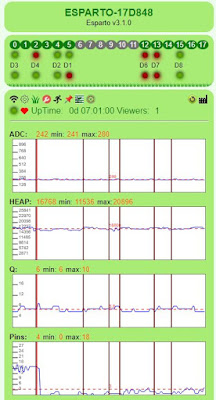


The vertical bars are added when I do the forced close. As you can see, a couple coincide with what might be the start of a "trough". Some don’t: they are either just natural “busyness” or plain and simple false positives. Since forcing a close has very little overall effect on the smoothness, and is actually now part of the "normal" mechanism, "Frankly, my dear, I don't give a damn!"

What I do care is that the behaviour is – at last – predictable and controllable as well as being a reasonably good user experience for quite a heavy load:

Esparto.flashPattern("   ... --- ...",250,LED4);
Esparto.flashPWM(1400,10,LED5);
Esparto.flashLED(500,LED6);

D4 is toggling at a rate of 125mS or 8x per second. D8(LED4) is flashing S-O-S in morse code, i.e. … --- … on a timebase of 250ms i.e. each dot / dash is about 1/2 - 1/4 sec long sec on a continuous loop. D7(LED5) is a 10% duty cycle blip in 1.4sec period and D6 (LED6) is a simple 2x per second “square wave” so when the “peaks” line up, you are getting 12 transitions per sec from 4 different pins and the UI appears pretty responsive. Being honest, it can’t quite “do” the three short Morse blips, but now that it is stable and predictable, I can try upping the frame rate as well as well as tweaking down the Q threshold to get the optimum result.

With hindsight, If I had chosen the ”investigate / reverse engineer / fix / update” someone else’s highly complex library” route first, I’d have saved myself well over a week and a lot of hair.

Lesson 2: Don’t shy away from tough decisions if - in the long run – they are the best.

Lesson 3: Check your library versions regularly even if there is no sign they may have changed!

Lesson 4: Not all “upgrades” are good ones. For example, core 2.5.0 adds over 30k to the bin file for Esparto. Thirty K!!! It wouldn’t be so bad, but Esparto is pretty big already – in core 2.4.2 its about 430k so 2.5.0 puts that up to 450k…kinda right on the limit of what can be OTA’d into a 1MB device with the minimum SPIFFS for the webUI… Worse there is less free heap to start with, and what brought us here? Correct: low heap management - 2.5.0 just makes it worse. Right now , for me 2.5.0 is a huge retrograde step – and if that weren’t bad enough, there’s a real killer:

Esparto will simply not serve up its web page in 2.5.0 – its like it is running in glue / treacle. The exact same line-for-line code that works (now!) perfectly under 2.4.2 cannot get to first base and – for now – I’m all done with fixing other peoples’ bad upgrades. I’ll have to find a way around it a some point.

On the plus side: The web code is much more robust, and more easily expandabel if / when new features come along. The same is true of the core code and a few quite useful new features have been added:

"repeatWhile" function. Repeat function f1 every n mSec while f2 returns true and call f3after f2 returns zero to stop the repeat. This is perfect for “worker” threads “chunking up” a job in the background to conserve heap. F1 repeatedly performs a “chunk”, adjusting a counter / pointer F2 return the counter / pointer while its non-zero (still work to do) f1 keeps repeating and once all the data has been done, f3 can clean up / reset counters for next time etc. All of this is “interleaved” with other tasks, minimising heap loss and streamlining overall throughput.

Its what my "netFlix" function uses, and yes, I did call it that:

	
if(!netFlix){		
    Serial.printf("Start strobing @ %d (=%d.%dfps)\n",CII(ESPARTO_FRAME_RATE),1000/CII(ESPARTO_FRAME_RATE),((1000%CII(ESPARTO_FRAME_RATE)*100)/CII(ESPARTO_FRAME_RATE)));
    netFlix=repeatWhile([](){ return tab::nViewers(); },CII(ESPARTO_FRAME_RATE),
		[](){
		    vector<string> cp;
		    ESPARTO_CFG_MAP cPin;
		    int n=0;
		    for(int i=0;i<ESPARTO_MAX_PIN;i++){
			if(_spPins[i].dirty) cp.push_back(_light(i));					
			_spPins[i].dirty=false;				
		    }
		    if(cp.size()) _spoolBcast(jNamedArray("gpio",cp));
		},
		[](){ netFlix=0;Serial.printf("LAST PICTURE SHOW\n"); }
    ,ESPARTO_SRC_WEB,"flix");
}

While there are any UI viewers, repeat the "send changed pin" @ ESPARTO_FRAME_RATE. Oncce all viewers have gone, reset initial conditions so next viewer restarts.

Very simple but incredibly useful is vBar. It simply draws a vertical bar of a given color (default = red) across all graphs asynchronously, i.e. when you want it to happen, to show when a particular event has occurred, in context. I could not have fixed this problem without it!

Thrown in are web basic auth and the ability to change MQTT parameters through the UI and Amazon Echo v3 compatibility among several others minor changes.

Esparto v3.2 will be (code-wise) very different from v3.1 (almost a re-write!) even though it will look almost 90% the same! It will be out as soon as I’ve had a day off and got some of the new documentation(yuk) fixed up and new example code written.

Friday, 1 March 2019

Esparto videos 3 & 4: LED flashing

Video no 3:flashing LEDs in a variety of interesting ways


 Youtube overview


Video no 4: (bonus) rotary encoders sorts out a technical issue from video3


 Youtube overview


Thursday, 28 February 2019

Tuesday, 26 February 2019

Esparto v3 finally released!

Blimey, it's finally done. Esparto v3.0.0 released! (subject to some documentation additions and tweaks) Some fun facts:
281 files in 72 folders totalling 11.8MB
Main code is 16 source files totalling 3742 lines of code
Includes 47 example sketches totalling 3704 lines of code..I'm happy to call it 7500 lines of code...

Friday, 15 February 2019

Why "The Cloud" is the bottled water of the Internet

I have been "on the Internet" since before most people had heard of it, and certainly well before the "World Wide Web" was invented. As a nerd, a geek, an early adopter and a technical purist (some would  - rightfully,perhaps - say "pedant")  I groaned when "ignorant " folk said "Internet" when they really meant "world wide web"...

It didn't take long for the two to become synonymous as the backwaters of the Internet wherein resided archie and gopher and ftp and smtp and pop3 etc were subsumed into the great beast that was "the web". "The web" -  where you could read email in a browser! And download files - from a browser! And....etc ....from a browser! OK, OK, I give in, I'll stop calling it the "world wide web" and start calling it the "Internet" just to make you happy even though I know it's wrong, but I insist on keeping that capital "I", ok???

What I will not do, no nay never is call it the fucking "cloud". And yes, I'm angry about it.

For one small moment after the execrable a*hole from marketing / sales invented this meaningless term (can you tell I don't like it, yet?)  - for one tiny, small, fleeting, worrying  moment - I thought "the cloud" was something new that I needed to know about. I had a huge technological FOMO experience and rushed to find out what it was. What I found was - if you'll excuse the expression - a cloud of obfuscation, buzzword bullshit bingo, marketing jargon and management-speak for (cough) - the Internet. Or, as I saw in recently in someone else's facebook post - in a rare moment of clarity for that platform - "someone else's computer".

Yep, that sums it up nicely. "The Cloud" is a salesman's invented concept to sell you access to someone else's computer that you don't actually need. To get that access, you use the Internet, but thats all too technical and and complex, so we jsut say "In the Cloud". As in where your head must be when  you buy bottled water.

In most developed nations, or indeed any country where the water is safe to drink, paying for bottled water is the result of a marketing man's greatest wet (literally) dream: Get people to pay for something they already get for free. Package it in toxic, planet destroying plastic, invent a sexy deceptive name evocative of cleanliness, purity (yeah those same requirements for the stuff that comes out of your tap) and charge money for it to gullible suckers who think it's different from the stuff that comes out of their taps - which is perfectly good anyway - when sometimes it's even the same stuff out of the same tap.

Yes, there have been several documented cases where unscrupulous* operator have taken mains water , bottled it, given it a fancy name and sold it at something like 10gazillion percent markup. The same stuff. People actually pay money for the same stuff that comes out of their taps. *It makes it hard to call such operators "unscrupulous" when the general public is so dumb and lemmingly free with their money...what next? Getting people to pay to wear your advertising logo on their clothes and shoes...damn, that ship has sailed...

Seriously, any time I see anyone buy bottled water I want to punch them really, really hard. I get a similar twitch when I see branded clothing, but that's less than it used to be.

Some may say that the music business are the kings of "reinventing the format" to make you pay again for what you already own - and that is true, but at least something has changed each time: CD was more robust and less scratch-prone and hissy, mp3 is waaay more convenient and portable etc

Neither bottled water nor "The Cloud" have that redeeming feature, both are actually worse than the equivalent you already paid for: either by pollution in the former case and massive security isses in the latter. But the principle of "pay up, pay up, and pay up again" is the same driver behind them all.

In the (g)olden days, you paid for a cardboard box with a CD and a manual in it. For "paid" read " often a very large sum of money" - but then you could sit back and use it for many a year. The provider could no longer milk you. Solution? Put it "in the cloud" and charge a subscription, now you are hooked into them for life. Open your wallet and repeat after me "Help yourself".

You would, of course, need to invent some reason why it was better - especially if it wasn't - but that's what marketing and sales are best at: fancy new names for the same old shit, subterfuge and glitz to part you from your hard-earned cash. Now you have been duped - sorry - persuaded to put your private data onto somone else's computer - sorry "in the cloud" you need security, privacy protection, backup etc etc all of which - of course - cost more. Its brilliant if you are a provider, bullshit if you are a consumer. Unnecessary, expensive bullshit at that.

A lot of brilliant, resourceful and respected people invented the Internet. No technician ever had a hand in inventing "The Cloud".

Remember, it is just "someone else's computer". Personally I prefer to keep my data on my own computer - its cheaper, and I'm not going to go bust or disappear overnight or sell all my data to the highest bidder or get specifically targeted by hackers...

"In the Cloud" = "On someone else's computer".


Monday, 4 February 2019

Esparto V3.0 nears release

Esparto v3.0 will soon be released: here's a little taster of the pin types available - v3.0 allows you to add them at runtime with no programing!


"Stupid" code examples and WiFI startup times

I frequently moan about the standard of example code "out there". I also roundly deride the "standard" technique of using WIFi.begin in setup() as opposed to monitoring WiFI events... The main reason being that the former requires a reboot in the event of router / net failure and will almost certainly hang or crash + reboot cycle. The "sensible" method can continue to run hardware and simply reconnect automatically when the router comes back up... I have also known that the startup time is longer in the "stupid" version, but never got around to actually measuring it. The reason I call it it "stupid" is because DOING NOTHING AT ALL works just as well, i.e. the code is utterly redundant as well as being slower! While shaving nearly half a second off your start time may not seem amazing, how about shaving 3.35 seconds off? Since the sensible method start running the loop almost immediately after setup, your critical hardware is up and running in microseconds, literally (716 in the code that follows) whereas the "stupid" method cannot start the loop until it has connected - in my house about 3.3secs. The actual values are here: Stupid LoopStart Sensible Loop Start 3502034 3502043 3019311 715 3001939 3001948 3012237 714 3002018 3002027 2925192 718 3502023 3502032 2908446 718 3502016 3502025 3011961 714 3502019 3502028 2927768 716 3001946 3001955 3013314 718 3502024 3502033 2922075 715 3502023 3502032 2909590 719 3502020 3502029 2921998 715 AVG 3352006.2 3352015.2 2957189.2 716.2 Diffs: WiFi 394817 Loop 3351299 So, the sensible method is 0.4s faster to connect to WiFi, 3.35 seconds faster starting the "real" code...is less code to write and allows automatic re-connection whereas the other usually crashes or hangs... Dr Phil's surgery is now open to listen to anyone who would care to justify using the "classic" method...

#include <ESP8266WiFi.h>

uint32_t baseline = 0;
uint32_t loopStart = 0;
volatile uint32_t connected = 0;

#define STUPID

#ifdef STUPID
const char* method = "stupid";
#else
const char* method = "sensible";
void onWifiEvent(WiFiEvent_t event) {
  if (event == WIFI_EVENT_STAMODE_GOT_IP) connected = micros();
}
#endif

void setup() {
  baseline = micros();
  Serial.begin(74880);
  Serial.printf("T+%d WiFi startup timer using %s method baseline=%d\n",micros()-baseline,method,baseline);
#ifdef STUPID
  WiFi.begin("LaPique", "");
  while (WiFi.status() != WL_CONNECTED) {
    delay(500);
    Serial.print(".");
  }
  connected = micros();
#else
  WiFi.onEvent(onWifiEvent);
#endif
}

void loop() {
  if (!loopStart) {
    loopStart = micros() - baseline;
    Serial.printf("T+%d Loop started\n",loopStart);
  }
  if (connected) {
    Serial.printf("T+%d WiFi was connected after %d uSec\n", micros()-baseline, connected - baseline);
    connected = 0;
    ESP.restart();
  }
}

Tuesday, 25 December 2018

Documentation? Shmockumentation!


When I spout my views on documentation, I know all too well that they not universally popular. Also, I’m aware that they are quite rare. I can’t remember anybody high-fiving me and shouting “Yessss! You nailed it Phil, that’s exactly how I see it” - and I have a good memory.

A lot of folk think I’m saying it just to be provocative, but I sincerely believe that code should contain as few comments as possible and preferably none. By all means some description needs to be somewhere – a separate document preferably but a stone tablet will do for me as long it’s not in the code. Hear me out before you spit your coffee while snorting in derision at me. Here are my golden rules of Shmockumentation

Firstly, what runs? Code, not documentation. What just failed? Code, not documentation. What is it precisely you need to fix right now? Same answer, hence Rule 1 is: Code is code and comments are comments and never the twain shall meet. If you want to know what code is supposed to be doing, then feel free to read the documentation as long as you accept rule 2. If on the other hand you want to know what the code is actually doing, there is only one place to find that: in the code itself.

Rule 2 is derived from the truth that both me and the Arduino ESP core god-coders are not the only programmers that don’t like doing documentation: no-one does. We’re coders, we code therefore we are. Documentation is for wimps. This inexorably gives rise to the reality that documentation is always, but always out of date because it’s always going to get fixed once the code is finally working. 

And at the moment it’s not. That’s not only understandable, it’s actually predictable because what are we trying to produce, to deliver? Code, not documentation. Anybody who shouts “code and documentation” is not going to last long on the team when the hammer is down. Imagine, if you will, this conversation with the project manager, especially if the project manager is me:

Coder: “I don’t think my code is going to ready on time…”
PM: “Why not?”

Coder: “Well I’m very keen on good documentation, so…”
PM (interrupting): “We all are, of course - we’re professionals!” while thinking internally “When exactly did I lose my soul and find this management-speak garbage so easy to slipstream into the conversation because everybody above coder expects to hear it?”[1]

Coder: “yes, of course, but I have let the code slip a little as I’ve spent more time than I should have on documentation”
PM (with furrowed brow): “How is that possible? How can you accurately document what isn’t actually finished yet? What if you find a late design flaw that needs a strategy change? You’d have to rewrite a huge chunk of the documentation, which means that all the time you have wasted - sorry, “spent”, no, wasted on the gold-plated but now utterly useless documentation could have been spent writing the code which is what we pay you for and it might have already been finished!”

<long pause…much fierce eye avoidance>

Coder: “Sorry I hadn’t looked at it that way before now…”
PM: (never one to miss an opportunity): “Exactly!” and then, remembering the HR B.S. – sorry, “guidelines” – “Look, put it to one side and concentrate on the code from now on, eh? If it’s ready by Monday, I’ll buy you a couple of beers, OK?”

Coder(thinking “Hey, maybe not all PMs are meanies!”): “Thanks, I’ll get right back on it!”

PM (absentmindedly reverting to type): “And if it’s not, you can pick up your cards on the way out!”

Fanciful?  Or more real than we care to admit? Code is what matters and even (rare) good documentation just gets in the way of the code when you are looking for a subtle bug. Worse it can lead to confirmation bias:

// calculate commission percentage
comm=…

can easily seduce the bug-hunter by leading her to think: “simple percentage calculation one-liner, no-one gets those wrong at this level, can’t be that, next!”...and she has just missed the late-night-tired-and-wanna-go-home “schoolkid error” division by zero.

Had the comment not been there, she’d have more likely thought “What’s ‘comm’ and what’s it doing here? Hang on a minute, that divisor hasn’t been given a value, yet! Bingo! ZERODIV error! That was an easy one, now back to my own code!”

Which leads us to rules 2a and 3. 2a is that not only is documentation always out-of-date, it is so the moment it is written. It just is. Why? - Because people like me are too busy coding to update it, that’s why.

Rule 3 is a killer. It’s that you can’t tell a piece if documentation is good or bad until you analyse the code that it relates to. It's only "good" if it accurately describes the code that follows. Thus in order to make that assessment, you have to read all of the documentation, read all of the code then mentally analyse and compare both.

Can you see where I’m going with this yet? If it is good documentation then you have learnt nothing: because you were always going to analyse the code anyway so you will know what it actually does! All you did is waste that time reading comments when you could have been bug-hunting. So the code works and the docs describe it...but what matters is: the code works (Rule 1) - more importantly - it works irrespective of the presence of the comments.

If, on the other hand it’s bad documentation, you now have to make time to take it out . In doing so you nicely proved my point in that if it weren’t there at all, you’d have finished the whole thing earlier. Of course , there is NO WAY you'd leave in known bad comments, is there? To do so just proves rule 2a: "...people like me are too busy coding to update it..."

In summary: bad comments slow you down and confuse you, good comments just slow you down. Either way: any comments slow you down. Lose them.

The final nail in the coffin for comments in code is rule 4 - clarity.

If you think your code needs documenting, is it because it is not clear - even to you, its author? If it's clear by- definition - it doesn't need comments. If it is not clear, you are a bad programmer, and no amount of commentary will fix that!

If your code works as per spec, then the spec is the required documentation and all else is superfluous. If the code doesn’t do what the spec says, you are in for a chat with the PM and some advice on how not to end up in the dole queue. If it does what the spec says but needs additional explanation then it may well work but it’s not good code, because it’s not clear and the PM is free to see you now.

There’s no way out. Documentation in production code is a BAD THING.

Code runs, documentation doesn’t. Good code is self-documenting. Only in our AI dreams is good documentation self-coding. Did I say “dreams”? I meant “nightmares” – we’d all be out of a job and the Wimps would rule the world. Bin the docs, fix the code. I like the ring of that, I may have it carved on my gravestone.

In closing I have a tale from the archives to illustrate these point in a self-deprecatory manner:

In my very early days as a programmer (think "vacuum tubes") I discovered a neat but very tricky way to shave a few bytes off an already well-bloated and much-amended tattered lace curtain of a program (good lord, I have just realised I can even remember its name: “VA54”. Snappy, eh?).

Very pleased with myself and somewhat smugly, I wrote a natty comment (mainly just to amuse me) which read “Clever Coding Conserves Core!”[2] and forgot to take it out before getting my paper tape punched up (yes, it was THAT long ago!) A couple of weeks later I had another amendment to this ragged gargantuan behemoth which had in the meanwhile also been amended by one of the senior programmers.

To my shame and horror, my killer code had been replaced by the longer-winded but cleaner-looking and much more easily-recognisable "traditional" version. Worse, the comment now read “Convoluted Coding Clouds Clarity”. Touche-bloody-A! It stung my pride at the time but taught me a valuable lesson not found in many books.


[1] Ah yes, now I remember, it was the day after I got the pay rise and promotion... :)
[2] “core” is the very old abbreviation for magnetic core memory

Monday, 24 December 2018

How real is time?


More specifically, how fast is “real-time”? The very phrase “real-time” is a deception – nothing in the physical world happens in “real-time” except time itself. Even if it’s only a few nanoseconds, the voltage on an input pin takes time to rise. How quickly after you press the button should the LED come on before you call the cause and its subsequent action to be “real-time”? Is it sufficient for it to be undetectable to the human eye even though that might be an age in computer terms?


Real-time is therefore a subjective measure, by anyone’s standards. The difference between the cause and the action is known as “Latency”. Take the case of an interrupt. The ESP8266 takes a finite number of clock cycles to recognise an interrupt and that’s after the inherent latency of the voltage rise time from the actual initiating real world-event. Already we have some latency in the system. How much? At its standard 80MHz clock rate, typical its 10 us - 80us but can sometimes be as long as 300us.


That is only the start of the story, as an interrupt on its own is useless without some user code to then do something with it: The Interrupt Service Routine (ISR).Any half decent programmer used to dealing with interrupts will tell you that you have to keep the ISR as short as possible. It’s to a) reduce the latency and b) reduce the opportunity for cross-process interference in the absence of OS-enforced isolation. It’s common to just set a shared flag (often in global scope) to signify “something has happened” and then have the main loop check the flag as often as possible. The ISR has latency, the main loop check adds more.


Finally, doing what’s actually needed e.g. lighting an LED (which of course has its own output voltage rise-time latency to add…) will add plenty more. The point here is this: there will always be a measurable delay between the cause and the subsequent outcome.


The real question then becomes “what is the maximum acceptable delay for this application before we can consider it to be real time”. I don’t know if there’s an “official” answer to that. Personally, I happily run my house lights and alarms with my home-grown firmware “Esparto” and you should too. I would also happily run your life-support system on it, but I wouldn’t necessarily want mine connected to it.


With Esparto, there is an extra layer in the GPIO pin handling, as it has to react to each and every designated input pin so that it can maintain the pretty flashing lights when the web UI is open. Obviously I have tried to keep it as lean and mean as possible but it has all the overhead of a websocket and then the network transmission time to the viewing device.


On top of even all that, there can be more latency added by the internal serialiser / scheduler deep in the code which can occur when lots of other stuff is happening “at the same time”. There’ll be a lot more on this later but for now take it from me that the pretty flashing lights are for information and entertainment purposes rather than precise measurement. There can occasionally be a tiny (but visible) lag between the built-in LED going on and the web UI pin lighting up. The faster you flash, the worse it gets. The more other pins you have active, the worse they all get.


To the casual observer, its real-time. To me, its real-time. To the purists, nerds and boffins, it may be far removed from what they define as real-time. In my own odd ways I’m probably a bit of all three of the last group, so I know I’m slightly deluding myself when I say “To me, its real-time” – but it’s good enough.


In the world of IOT that we inhabit, there are very few things that need to be "real-time". Interrupt handling is complex and difficult to get right, even for experienced programmers. Novices should stick to polling - the rest of your code will be taking the Lion's share of the processor and any "loss" of latency will not be noticed - really, it won't!


IF you are an expert and you know - for example through some specific hardware timing issues - that you need interrupts, then by all means use them. That excludes 95% of the folk I encounter in groups and forums, so for the rest of us, forget interrupts, you don't need them. Either stick to simple polling - or use a library like Esparto that has already done all the hard work for you

Thursday, 18 October 2018

A "sometimes I amaze myself" soldering repair

I have two TP-LINK powerline extenders (TL-WPA4220) which allow me to have WiFi in the far reaches of my empire. Well in my big barn, at least, one for each end as its 50m long with walls of 0.75m granite. Anyway, voila:


So far so good until a recent flood (about knee deep) and one was fitted low down and got drenched. It was unpowered at the time, so with a little patience and perhaps a hair drier - in theory, at least - all should have been well, because they ain't cheap! The problem with that last statement was the wod "patience" - I have little and thought it was dried out when it obviously wasn't....

Buzz click pop, bad smell and I let the blue smoke out. Because I'm in remote rural France I have to get everything online and delivery is - er, well - "Gallic" let's say. So as well as the cost, it's the inconvenience, and so I thought I'd open 'er up and see if it was maybe just a fuse ha ha. This is what a good one looks like inside - there is a LOT of stuff in there, but pay attention to the expanded section, becuase that's where the problem lay.


That problem was fairly obvious: in between the big 4.7uF cap on the left and the pale green vertical inductor on the right - and under the tough white rubbery goo keeping some of the high voltage parts safe - something (who knows what?) had gone "pop" in a fairly big way. When I say "fairly big", I mean a) so that it wasn't actually there anymore b) it has taken out the green solder mask underneath and with it, a fair part of the copper track linking it ot the 4.7uF cap. c) the smoked remains of whatever it had been were all over the cap and inductor and inside the case. Even the rubbery goo was blackened. The inductor and cap were so blackened that I didn't know at first what had popped. It was only when I removed them to see if they were still viable that I spotted the disaster zone*. Ironically, both were fine and fully "in spec" and cleaned up fine.

*Spotted the disater zone only after I had taken a scalpel to the white rubber goo to cut away enough to see "what lies beneath". Answer: an empty pad marked "FB1" and the aformentioned bare board and missing copper. All in all, not good, but I hate being beaten. I mean I didn't even know what an FB might be, but I knew I didn't have one "in stock". Turns out its a ferrite bead and it looked as if it was probably an 0603 size...

I'm okay with 0805s but 0603s strike fear into my heart. I had had some recent success with SOD-323 diodes on some blown Wemos D1s and they aren't much diffferent from an 0603, so...


I trawled ebay to try to find some 0603 ferrite beads...and then I thought "Maybe some of my old "junk" boards might have something...long story short - whole house search until I removed a modem card (!) from an ancient PC. It held not just the one bead I'd need but four - which was good news as anyone who has ever dropped / pinged / burned / lost anything that small. So - with the obligatory cocktail stick tip as reference - we have the blank spaces where the FBs used to be and my calipers showing each to be 2.3x1.3mm - actualy slightly(!) larger than the SOD-323, but this has to go into a space I can only just get into!


First, I cleaned off all the soot residue, removed some "erupted" copper trace, flattened the remainder, polished and fluxed and tinned it...I was only going to get one go at this...

Taking a clear photo of the result is pretty much impossible without an industrial microscope, as the scale is so minute, but my best offering follows. Think back to the "good" shot above, remind yourself of this size of this thing and where it has to go back into:
...and it's a marvel I managed at all! So even though it's a terrible shot, it allows us to see several things:


First, you can see some soot still on the white rubber goo and where I had to scalpel it out...Secondly (despite vigorous scrubbing with isopropyl alcohol) the white FB1 legend is still burn-stained. Third, how close I had to get to the 4.7uF cap with my (huge) track repair...

As I look back at this and the good "before" shot, I relaise the original was probably an 0402 size. I'm glad I never saw it - I'd never have dared. Also using the bigger(!) 0603 helps bridge the gap in the blown-out copper track...

No-one, dear reader, was more surprised than moi to find an instant power on, lights cycle, reconnect to the "other end" of the power line adapter and my SSID being broadcast strongly...all as I stood by with fire extinguisher at the ready...


Monday, 27 August 2018

Esparto v2.0 finally released!

Yes, it's "out of the door" at last. After some final "stress" testing and the creation / testing of 32 (yes, thirty-two) example programs, v2.0 finally goes public.

Intervening health problems added 8 months to the date(!) but at last I can now relax somewhat- with a well-earned beer.

Get Esparto v2.0  here at github 

Monday, 20 August 2018

Esparto V2 almost ready! The new web UI part 6

The lower panel(s)


Run


This is literally where the action happens. Esparto is designed so that commands can come from several sources:
  • MQTT topics
  • the web UI
  • from within the app itself using the "invoke" functio
The first is one of the most common forms of communications between IOT "things" in home automation. You obviously need access to an MQTT "broker" (fancy name for "server", really) either your own or public one. At this very moment, there is no way to enter a username and password - except manually in your own code - so until I get that fixed... your own broker is the best bet. I use mosquitto (which can be found Mosquitto.org download page) on a raspberry Pi.

But don't despair if none of those options are available, you can still do a lot with Esparto through its own UI, or from your own code. Want to change GPIO0 (D3)'s debounce value for example? Either call Esparto.invoke("cmd/pin/cfg/0/15"); or come to this screen, select the cfg option form the dropdown menu, add the /0 to the Topic line and type 15 into the payload field. Then hit "Simulate MQTT" - Esparto's internals that actually "do the business" are called with exactly the same message as they would have received from a genuine MQTT server. Simples.

As commands are received and actioned (from any source) the stats are dynamically updated. Soon - and certainly before release - I shall add "Alexa" as a source because Esparto is fully Alexa-compatible by pretending to be a Belkin WeMo when asked in the right way. All it can do is "turn on "<your device> or "turn off" the same. That's as much as a lot of devices do, anyway.

The "all" source is special one built in to Esparto allowing you to send a single command to all Esparto device on your 'net, as well as addressing each one indvidually by its device name. For example - while not necessarily advised - "all/cmd/reboot" will do exactly what you think it would.

Users can to subscribe to any topic they choose - including # wildcards - when called back in onMQTTConnect (see previous post in the series for a simple example).

In the demo, the user has subscribed to a wildcard topic like so:

  Esparto.subscribe("wild/#",[](vector<string> vs){ 
        string suit=vs.front();
        Serial.printf("Wilcard handler suit is , card is %s\n",(CSTR(suit)),CSTR(vs.back()));
        if(suit=="hearts" || suit=="clubs" || suit=="diamonds" || suit=="spades"){
          Serial.printf("You chose the %s of %s\n",CSTR(vs.back()),CSTR(suit));
        }
        else Serial.printf("Invalid suit %s\n",CSTR(suit));
    },"cards"); 

(They also included  (not shown) a simpler topic "flash" which they wrote to call the same code as Alexa commands call. So when Alexa is told to "turn on testbed" it has the same effect as MQTT command "testbed/flash/1" for on  and ...0 for off. )

He/she has chosen to only allow this wildcard topic from another made-up source "cards"  so "testbed/wild/party" won't work, but" cards/wild/animal "will.

And therein lies a slight oddity - and a caution. Esparto cannot predict the billions of permutations that come after ...wild/ - only the user can decide that. Hence for the system to work Esparto not only has to accept anything of that form, it also has to add it to the above table and count it and that has consequences.

The user code in the demo rejects any subtopic except (rather suitably) hearts, clubs, diamonds and spades and would like the payload to be a card from 2 to 10 or J K Q A. Lazily, it doesn't actually validate the payload, but then all it does is parrot ack to you what you send it, so no harm done in this contrived case. In the real world such appalling coding (I should know, I wrote it - deliberately to bring out these points of course) will almost certainly lead to a crash if unexpected, unvalidated input and/or gibberish is fed to any wildcard topic - so be careful. Trust no-one, and validate everything to within an inch of its short life.

Another consequence is that the more wild rubbish you send that Esparto is duty-bound to accept, the longer that list will get, the slower the UI will become until finally Esparto's self-protection mechanisms will cut in and reject  everything from all sources until some memory is freed somehow. This will certainly cause erratic behaviour and possible meltdown at the nuclear power plant, so don't do it. If no memory can get freed, then your Esparto app will die a slow lingering death till you want to reboot it. When you do, remember it's your fault, not Esparto's. 

While this a shorter section than some others, this pane is probably one of the most useful of Esparto's many features. There is neither the space nor the time to go into detail about each of the commands and new ones are being thought of as I type...

You may find that all the ...dump... options are missing from the final release, as they are 90% used in debugging. It will be done in such a way that even average programmers will be able to hack into the code and just turn on a #define and recompile. They do steal heap though, whic is already in short supply so don't say you haven't been warned. On the other hand if I can trim some fat from elsewhere during my final code tidy, I might leave some/all of them in. Invoke("cmd/watch/this/space"), you might say.

Others are just fun to play with: .../pin/flash/... , .../pin/pwm/...  and  .../pin/pattern for example/...

Download the release when it's out "soon", edit in your own SSID/password/device name and give all the topics/commands a try - it's what Esparto is for.  Or wait 3 minutes for it to give up and go into AP mode then configure it with your phone.

And enjoy it!